Graphic designers use creative typography to communicate more than
just the basic meaning of the words. Explore creative ways to use type
including student work, posters, and fanciful type treatments. Do
typographic exercises that allow you to expand your own creative use
of type and fonts. We, of course, will be using Photoshop to do this.
In class example: Glass Text
Easier:
Gel Text
Light Burst: Working with Channel Layers
Harder
Striped Text:
Student's choice:
Choose your own
Showing posts with label photoshop. Show all posts
Showing posts with label photoshop. Show all posts
7/03/2007


6/25/2007
Quick Masks
The uses for masks are endless and Photoshop offers many different types of masks and way to create them--their purpose is to control which areas of an image or layer are edited. They also control which areas are hidden or revealed. Masks offer to advantages:
1) Masks are non-destructive--none of the original work is edited or deleted. It is simply hidden.
2) Masks are flexible--they can be changed at anytime to reveal or hide areas.
Quick Mask:
Quick Mask function is actually a selection viewed in a different mode. Rather than the dotted-line marquee, it is represented in varying shades of red.
*Quick Masks are not permanent.
*The Color and opacity of the mask can be changed by clicking the Quick Mask icon.
Tutorials:
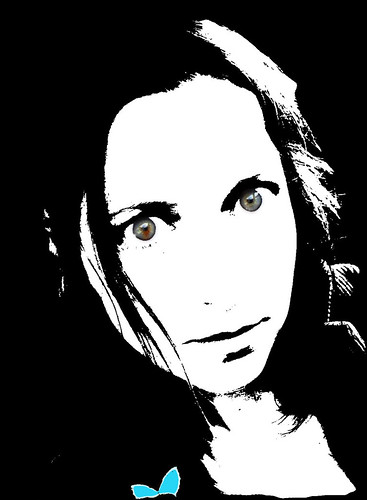
Bright Eyes (basic/start here)
Butterfly Partial Color
Using Masks to Remove the Background
Learn Hawk-Layer Masks
Try the image in the tutorial, then do one on your own!
1) Masks are non-destructive--none of the original work is edited or deleted. It is simply hidden.
2) Masks are flexible--they can be changed at anytime to reveal or hide areas.
Quick Mask:
Quick Mask function is actually a selection viewed in a different mode. Rather than the dotted-line marquee, it is represented in varying shades of red.
*Quick Masks are not permanent.
*The Color and opacity of the mask can be changed by clicking the Quick Mask icon.
Tutorials:
Bright Eyes (basic/start here)
Butterfly Partial Color
Using Masks to Remove the Background
Learn Hawk-Layer Masks
Try the image in the tutorial, then do one on your own!
2/26/2007
Free Web Helpers Collection.
I collected a various assortment of web tools that may prove helpful. Some items are free downloads--others are tools that can prove helpful for creating webpages.
Overall useful website:
Web Design From Scratch
http://www.webdesignfromscratch.com/
"The site is for everyone involved or interested in creating web sites - whether novice or expert. It will help you understand what makes web sites succeed or fail, and what can be done to increase the chance of success."
Font Help:
Typetester
http://typetester.maratz.com/
"The Typetester is an online application for comparison of the fonts for the screen. Its’ primary role is to make web designer’s life easier. As the new fonts are bundled into operating systems, the list of the common fonts will be updated."
Color Helpers:
Color Schemer Gallery
http://www.colorschemer.com
"The Color Schemer Gallery is an online community where Color Schemer users can share and manage color schemes." No need to download the software, one can cruise the website for color ideas.
Free Brushes & Graphics Collections:
Free Vector Downloads
"As a designer its always handy to have a collection of pre-made vector objects available to use in your designs, whether its illustrator files or photoshop shapes."
Free Photoshop Brushes
"Every good designer needs an arsenal of brushes to use within photoshop, whether its a grunge effect or some tehno swirls that are required there is sure to be a brush that fits your needs."
28 Free Illustrator Brushes for making Swooshes and Swirls
Overall useful website:
Web Design From Scratch
http://www.webdesignfromscratch.com/
"The site is for everyone involved or interested in creating web sites - whether novice or expert. It will help you understand what makes web sites succeed or fail, and what can be done to increase the chance of success."
Font Help:
Typetester
http://typetester.maratz.com/
"The Typetester is an online application for comparison of the fonts for the screen. Its’ primary role is to make web designer’s life easier. As the new fonts are bundled into operating systems, the list of the common fonts will be updated."
Color Helpers:
Color Schemer Gallery
http://www.colorschemer.com
"The Color Schemer Gallery is an online community where Color Schemer users can share and manage color schemes." No need to download the software, one can cruise the website for color ideas.
Free Brushes & Graphics Collections:
Free Vector Downloads
"As a designer its always handy to have a collection of pre-made vector objects available to use in your designs, whether its illustrator files or photoshop shapes."

Free Photoshop Brushes
"Every good designer needs an arsenal of brushes to use within photoshop, whether its a grunge effect or some tehno swirls that are required there is sure to be a brush that fits your needs."
28 Free Illustrator Brushes for making Swooshes and Swirls
1/11/2007
Slice it like it is Hot!
 Hot Sliced Images
 A sliced image is actually a single image sliced or divided into multiple images. Each piece of the sliced image is called an image slice. Each image slice is an independent image file and can, therefore, have links, rollovers, and/or animations applied to it.
How is a sliced image different from an image map?
An image map is one image with multiple hot spots, whereas a sliced image is actually broken into two or more individual images, which allows for more flexibility and the ability to animate and/or swap individual image slices without changing the entire image. Unlike image maps, each image slice in a sliced image can utilize a different optimization setting, allowing for better overall image optimization. However, don't get fooled by this; although image slices may optimize more efficiently, downloading a sliced image means that multiple images must be downloaded. This process can take as long or longer than downloading one large image map. As a general rule of thumb, do not slice an image into more slices than is absolutely required for the desired effect.
Image slices can be created and edited in Photoshop or ImageReady; however, ImageReady provides more slicing options. Regardless of the application used, there are three types of image slices:
- User slices — User slices are created by using the Slice tool.
- Layer-based slices — Layer-based slices are created from layers.
- Auto slices — Auto slices are created based on what is left over after user slices and/or layer slices have been applied.
10/16/2006
Photoshoping Real Beauty
"Dove Evolution"
The Dove Campaign for Real Beauty (bus-ads with pictures of beautiful, but heavy, or old, or off-average models) has posted a video called Evolution. It depicts an attractive -- but blemished and drab -- model being prepped for a bill-board, from the makeup to the photoshop. It's a very effective short film.
The Dove Campaign for Real Beauty (bus-ads with pictures of beautiful, but heavy, or old, or off-average models) has posted a video called Evolution. It depicts an attractive -- but blemished and drab -- model being prepped for a bill-board, from the makeup to the photoshop. It's a very effective short film.
10/13/2006
Monster Photoshop Mashups
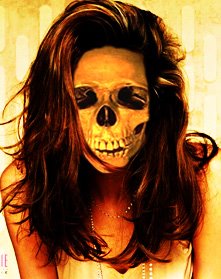 Portfolio Item #3
Trick or Treat! This week you will be creating a Halloween Photo for your portfolios on flickr. Your subject matter should come from something you created or shot.
**Remember this are supposed to be FUN so if you have doubts go without. This is not meant to offend individuals but to be an exercise in your creativity.**
Below are some links to get your creative juices following.
Haunted Memories
Monster Mod
I collected a number of tutorials that you can mix and match from. Please note you are free to find you own methods to create your spooky Halloween Photoshop creations.
Monsters
Scary Skin Texture--Using bugs to create skin texture.
Vampire--glowing red eyes and teeth with 24 steps
Vampire #2--glowing eyes, hair and teeth simpler steps.
Monkey Vampire Morph (monkey + blood sucker= monkey vampire?)
Skull Face--Replacing a face with an image of a skull.
Aliens--Turn an ordinary person into a green Alien.
Aliens #2--Transform someone into an Alien and add a new background
Zombies--Creating the undead.
Zombie #2--Using Mandy Moore to create a hole in your head
Super Quick Zombies
Ghosts--your 6th Sense @ work
Ghostly Background Imaging
Simple Ghosts
Casper
No Bodies: Removing a body from an image
Stone:
Stone Face effect--turning people into stone
Horror Movie Effects
Horror--super gross stuff **yucky**
Other effects:
Aging Photos--Turning color photos into wrinkled torn pages
Aging People--Turning young faces old.
Haunted House- photoshop your favorite contemporary house into an elderly, rotting haunted mansion
Grunge Look
Torn/Burnt Photo Edges--create burnt edges around your images
Fine Art Painted Effect-Merging fine art with current images. The process itself is not hard however the image matching can be a tuff fit.
Super Werid Dark Art--I am not sure what to say about this one. You end up with some big creepy looking thing with teeth and eyes.
10/12/2006
Pick it up
Today, we will be working with various selection tools. Below are some more extremely useful (and not very well-known) selection techniques: once you learn them, you will wonder how you ever got by without them.
Here are a couple of notes before you begin:
I tend to prefer hotkeys (e.g. [Ctrl+D] ), but I have provided equivalent alternatives (e.g. Select » Deselect – which denotes a menu command) wherever possible.
>>Select All [Ctrl+A] (Select » Select All)
Quick Masks
Selecting Stuff --Use a few of your own images to walk through each selection action.
Veggie Head Selection Practice
Here are a couple of notes before you begin:
I tend to prefer hotkeys (e.g. [Ctrl+D] ), but I have provided equivalent alternatives (e.g. Select » Deselect – which denotes a menu command) wherever possible.
>>Select All [Ctrl+A] (Select » Select All)
Quick Masks
Selecting Stuff --Use a few of your own images to walk through each selection action.
Veggie Head Selection Practice
Subscribe to:
Posts (Atom)